

The best drawing tablets by price fall into four tiers: budget tablets without a screen (HUION Inspiroy H640P, XP-Pen Deco 01 V2, Wacom Intuos S), mid-range screenless tablets (Wacom Intuos M Bluetooth, HUION Inspiroy H1060P), entry-level pen displays (HUION Kamvas 13, XP-Pen Artist 12 2nd Gen, Wacom One 13) and professional displays (HUION Kamvas 16 Gen3, Wacom Cintiq 16, HUION Kamvas 24 Plus). If you are just starting out, a cheap screenless tablet is enough to learn on; if you already draw every day, moving up to a pen display is the upgrade you will notice most.
In this guide we sort the models by budget, explain what you gain by moving up a tier and give you a clear verdict for each profile. The prices you will see are approximate and change often with deals and new versions, so treat them as a guide, not a fixed figure.
In short
- Below roughly 80 € (approx.) you get screenless tablets that are perfectly good for learning: HUION Inspiroy H640P, XP-Pen Deco 01 V2 and Wacom Intuos S.
- In the mid-range without a screen you pay for more surface, more shortcuts or wireless connection, as with the Wacom Intuos M Bluetooth.
- Entry-level 12 to 13 inch pen displays, such as the HUION Kamvas 13, are the first step towards drawing directly on the image.
- In the professional tier, the HUION Kamvas 16 Gen3 stands out for value and the Wacom Cintiq 16 for being a studio standard.
- The best budget is the one that matches how much you will draw: you do not need to start with the most expensive option.
Drawing tablets by price compared
This table sums up the models in each tier. The price range is approximate and may vary depending on the store and the time of year.
| Model | Tier | Approximate price | Type | Best feature | Ideal for |
|---|---|---|---|---|---|
| HUION Inspiroy H640P | Budget | Approx. 30 to 50 € | No screen | Only 8 mm thick, battery-free pen | First tablet or travel |
| XP-Pen Deco 01 V2 | Budget | Approx. 40 to 70 € | No screen | 10 x 6 inch area, 8 keys | Beginners who want room |
| Wacom Intuos S | Budget | Approx. 60 to 90 € | No screen | Wacom reliability, Chromebook compatible | Starting without hassle |
| HUION Inspiroy H1060P | Mid-range | Approx. 60 to 100 € | No screen | Large surface, 12 physical keys | Wide strokes and lots of shortcuts |
| Wacom Intuos M Bluetooth | Mid-range | Approx. 150 to 220 € | No screen | Bluetooth connection, medium size | Drawing with a laptop, cable-free |
| HUION Kamvas 13 | Entry-level display | Approx. 200 to 300 € | Pen display | 120 % sRGB, comfortable size | First pen display |
| XP-Pen Artist 12 (2nd Gen) | Entry-level display | Approx. 200 to 300 € | Pen display | Fully laminated, X3 chip | Students and small desks |
| Wacom One 13 (display) | Entry-level display | Approx. 350 to 500 € | Pen display | 13.3″ Full HD, paper-like feel | Those who want a Wacom display |
| HUION Kamvas 16 Gen3 | Professional | Approx. 400 to 600 € | Pen display | 2.5K QHD resolution at 16″ | Daily illustration and comics |
| Wacom Cintiq 16 | Professional | Approx. 600 to 900 € | Pen display | Pro Pen 2, studio standard | Professional use with top reliability |
| HUION Kamvas 24 Plus | Professional | Approx. 800 to 1,200 € | Pen display | Large QHD working surface | Fixed studio and long sessions |
Compare these 4 products side by side
Cheap drawing tablets: the best for under 100 € (approx.)
Cheap drawing tablets are screenless tablets: you draw on a surface and watch the stroke on your monitor. It takes a few days to get used to that hand-eye coordination, but it is a skill you pick up quickly and many professionals keep using it for life. For learning digital illustration, these tablets are more than enough.
HUION Inspiroy H640P: the cheapest pick
It is compact, only 8 mm thick, and its pen needs no battery, so you never have to charge it. Its working area is small, which makes it ideal for travel or as a second tablet, although it may feel tight if you draw long strokes from the arm.

HUION Inspiroy H640P
Compact, slim and with an accurate pen. Ideal as a second tablet or for travel.
- Only 8 mm thick
- Battery-free pen
- Very affordable
€ 34.20Price as of November 9, 2026 1:11 pm
Learn more for HUION Inspiroy H640PXP-Pen Deco 01 V2: more surface for little money
It offers a 10 x 6 inch working area and 8 customisable keys, which is rare at this price. It also works with Android, handy if you want to draw from your phone. It is probably the cheap tablet with the most room to move your hand.

XP-Pen Deco 01 V2
A wide surface and express keys for very little money.
- 10 x 6 inch working area
- 8 customisable keys
- Works with Android
€ 56.99Price as of November 9, 2026 1:21 pm
Learn more for XP-Pen Deco 01 V2Wacom Intuos S: the safe bet to get started
It costs a little more than the previous two, but in return you get very stable drivers and compatibility with Windows, macOS and Chromebook. It is light, with a battery-free pen, and it is the tablet most often recommended in art schools for your first steps. If you are torn between brands, our HUION vs Wacom vs XP-Pen comparison covers the differences in detail.

Wacom Intuos S
The most recommended screenless tablet for taking your first steps in digital illustration.
- Light and easy to carry
- Battery-free pen
- Works with Windows, macOS and Chromebook
€ 39.99Price as of November 9, 2026 1:11 pm
Learn more for Wacom Intuos SMid-range without a screen: more size, shortcuts and freedom
Moving up a tier without switching to a display makes sense once you know you will draw often. What changes here is not so much pen accuracy as comfort: more surface, more keys so you do not reach for the keyboard and, in some cases, wireless connection.
The HUION Inspiroy H1060P gives you the most surface for its price: it has 12 shortcut keys and 16 on-screen programmable keys, perfect if you make wide strokes. The HUION Inspiroy 2 L follows the same large-format approach with physical and programmable keys. If you prefer a slim design with a control dial, the XP-Pen Deco Pro MW is wireless and lets you switch brushes or zoom without putting the pen down.
The Wacom Intuos M Bluetooth is the pick if you draw with a laptop or from the sofa: medium size, no cables and Wacom’s battery-free pen. It costs more than its HUION and XP-Pen rivals, but the medium size tends to be the most comfortable for most people.

Wacom Intuos M Bluetooth
Medium-sized screenless tablet that connects wirelessly, comfortable for drawing on the sofa or with a laptop.
- Bluetooth connection
- Medium size, neither too big nor too small
- Battery-free pen
€ 69.99Price as of November 9, 2026 1:21 pm
Learn more for Wacom Intuos M BluetoothEntry-level pen displays: draw on the image without overspending
A pen display lets you draw directly on the image, just like on paper. It is the upgrade that people coming from traditional drawing notice most. In this tier, 12 to 13 inch models offer a very complete experience for an approximate price of around 200 to 500 €. If you are still not sure it is worth it, read our guide on drawing tablets with or without a screen.
HUION Kamvas 13: the best first display
It offers 120 % sRGB colour coverage in a size that fits comfortably on any desk. It is the entry-level option with the best balance of price, colour and size.

HUION Kamvas 13
13" pen display with good colour coverage to start drawing directly on the screen.
- 120% sRGB
- Desk-friendly size
- A good first pen display
€ 209,47Price as of noviembre 9, 2026 1:10 pm
Learn more for HUION Kamvas 13XP-Pen Artist 12 (2nd Gen): compact and popular with students
With 11.9 inches, full lamination and the high-sensitivity X3 chip, it is very accurate for its size. It fits small desks very well and is a favourite among illustration students.
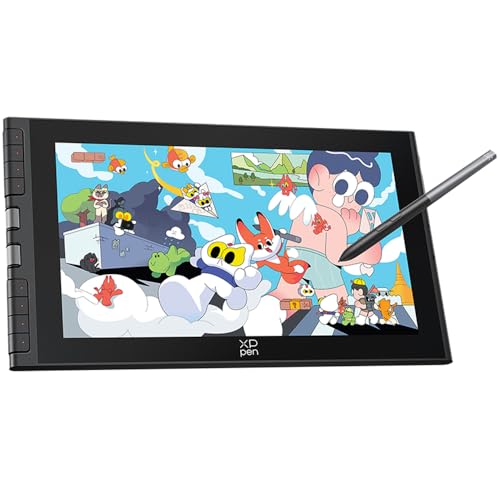
XP-Pen Artist 12 (2nd gen)
Compact 11.9" pen display that is very popular with illustration students.
- High-sensitivity X3 chip
- Fully laminated screen
- Perfect size for small desks
€ 188,99Price as of noviembre 9, 2026 1:21 pm
Learn more for XP-Pen Artist 12 (2nd gen)Wacom One 13: Wacom’s entry-level display
It has a 13.3 inch Full HD screen with a paper-like surface, and its pen is interchangeable with other brands. It usually costs more than rivals of the same size, so it makes sense if you value the Wacom drawing feel over saving money.
Professional drawing tablets: an investment for daily drawing
If you illustrate for many hours, work on commissions or make comics, a 16 inch or larger display gives you room to work with panels open and see your drawing in detail. Here the approximate price starts at around 400 € and can go above 1,000 € for the large models.
HUION Kamvas 16 Gen3: the best professional value
Its 2.5K QHD resolution at 16 inches delivers plenty of sharpness in a balanced size. It is ideal for illustration and comics, and costs considerably less than a similarly sized Cintiq. A slightly more affordable alternative is the XP-Pen Artist 16 (2nd Gen), with a 16 inch screen and a modest price.

HUION Kamvas 16 Gen3
16" pen display with 2.5K QHD resolution for illustrating with more detail and room.
- 2.5K QHD resolution
- Well-balanced 16" size
- Ideal for illustration and comics
€ 499.99Price as of November 9, 2026 1:10 pm
Learn more for HUION Kamvas 16 Gen3Wacom Cintiq 16: the studio standard
It is Wacom’s classic pen display, with the very accurate Pro Pen 2 and a paper-like surface. You pay more, but you get a tool found in many studios and known for its reliability.

Wacom Cintiq 16
Wacom's classic pen display for anyone who wants to draw directly on the image with that familiar feel.
- Very precise Pro Pen 2
- Paper-like surface
- A studio standard
€ 566.80Price as of November 9, 2026 1:21 pm
Learn more for Wacom Cintiq 16HUION Kamvas 24 Plus: for a fixed studio
With a large working surface and QHD resolution, it is designed for daily professional work. It needs a wide desk and a good stand, so it only pays off if you always draw in the same place.
How to choose a drawing tablet for your budget
- Decide how much you will draw. If it is an occasional hobby or you are just trying it out, the budget tier is enough. If you draw every day, investing in the mid-range or a pen display makes more sense.
- Choose between screen or no screen. Screenless is cheaper and better for posture; a display is more intuitive. Neither option is better in every case.
- Check your desk and monitor size. A small tablet with a large monitor forces very short movements; a huge tablet on a narrow desk is uncomfortable.
- Check compatibility. Make sure the model works with your operating system and your software. If you use Chromebook or Android, look at models such as the Wacom Intuos S or the XP-Pen Deco 01 V2.
- Keep a little for accessories. A drawing glove prevents smudges and accidental contact on the surface, especially on pen displays.
If you want something that works without a computer, the iPad Air with Apple Pencil Pro is another route, although it sits in a different price league. We explain it in iPad or drawing tablet for drawing. And once you have yours, follow our guide to set up a drawing tablet step by step.
Verdict by profile
- Minimum budget: HUION Inspiroy H640P.
- Beginner who wants room: XP-Pen Deco 01 V2.
- Beginner who values reliability: Wacom Intuos S.
- Drawing with a laptop, cable-free: Wacom Intuos M Bluetooth.
- First pen display: HUION Kamvas 13 or XP-Pen Artist 12 (2nd Gen).
- Professional on a tight budget: HUION Kamvas 16 Gen3.
- Professional who wants the industry standard: Wacom Cintiq 16.
Conclusion
You do not need to spend a lot to get started: a cheap drawing tablet such as the XP-Pen Deco 01 V2 or the Wacom Intuos S will serve you for years of learning. Once you draw every day, an entry-level display such as the HUION Kamvas 13 is the step up you will notice most, and if illustration is your living, the HUION Kamvas 16 Gen3 or the Wacom Cintiq 16 are investments that pay for themselves. Remember that prices are approximate and change often, so compare before you decide. You can browse every model in our drawing tablets section.
Compare these 4 products side by side
Frequently asked questions
What is the best cheap drawing tablet?
For most people, the XP-Pen Deco 01 V2, thanks to its 10 x 6 inch area and 8 keys. If you want the most stable drivers, the Wacom Intuos S. If you are after the lowest price, the HUION Inspiroy H640P.
How much does a good beginner drawing tablet cost?
As a rough guide, around 30 to 90 € for a screenless tablet and around 200 to 300 € for an entry-level pen display. Prices change frequently, so take these as a reference.
Is it worth paying more for a pen display?
Yes, if you draw often and struggle with the hand-eye coordination of a screenless tablet. It is not essential for learning: many professional illustrators work without a screen.
Can a cheap tablet be used for professional work?
Yes. The accuracy of today’s pens is good enough for professional work even on budget models. Paying more mainly gets you size, comfort and, on displays, image quality.
Which brand offers the best value for money?
HUION and XP-Pen tend to give you more surface or features for the same money, while Wacom stands out for reliability and as the professional standard. The choice depends on what you prioritise.
Some links on this page are affiliate links: if you buy through them, Ilustreando earns a small commission at no extra cost to you.
Leave a Reply