
· Updated
The best pen displays for illustration right now are the HUION Kamvas 16 Gen3 if you want the best balance of size, resolution and price, the Wacom Cintiq 16 if you value pen feel and Wacom reliability above all, and the XP-Pen Artist 12 (2nd gen) or HUION Kamvas 13 if you want your first drawing display without spending much. For daily professional work with plenty of room, the HUION Kamvas 24 Plus is the large option. Your choice depends mainly on size, resolution, screen lamination and how much desk space you have.
If you are still unsure whether to draw on a screen or on a screenless tablet, start with our guide drawing tablet with or without a screen. Here we take that step as settled and compare the screen models against each other.
In short
- Best all-rounder: HUION Kamvas 16 Gen3, thanks to its 2.5K QHD resolution at 16″.
- Professional 16″ benchmark: Wacom Cintiq 16, for its Pro Pen 2 and paper-like surface.
- Affordable first display: XP-Pen Artist 12 (2nd gen) or HUION Kamvas 13.
- 16″ at the best price: XP-Pen Artist 16 (2nd gen).
- Professional studio with lots of space: HUION Kamvas 24 Plus.
Pen display comparison
This table sums up the seven screen models in our catalogue. Prices are approximate and change often, so treat them as a guide to the price bracket rather than an exact figure.
| Model | Size | Key strength | Best for | Approximate price |
|---|---|---|---|---|
| XP-Pen Artist 12 (2nd gen) | 11.9″ | Full lamination and X3 chip | Students and small desks | Entry level, approx. €150 to €250 |
| HUION Kamvas 13 | 13″ | 120% sRGB | A first display with good colour | Entry level, approx. €200 to €300 |
| Wacom One 13 | 13.3″ | Full HD and paper-like feel | Wacom in a compact format | Mid range, approx. €350 to €500 |
| XP-Pen Artist 16 (2nd gen) | 16″ | Large size at a modest price | Moving to 16″ on a tight budget | Mid range, approx. €300 to €450 |
| HUION Kamvas 16 Gen3 | 16″ | 2.5K QHD resolution | Detailed illustration and comics | Mid range, approx. €400 to €550 |
| Wacom Cintiq 16 | 16″ | Pro Pen 2, a studio standard | Those who prioritise feel and reliability | Upper mid range, approx. €550 to €750 |
| HUION Kamvas 24 Plus | 24″ | QHD resolution on a large surface | Daily professional use | High end, approx. €800 to €1,100 |
Compare these 4 products side by side
Compact 12 to 13 inch displays
12 and 13 inch displays are the entry point to drawing directly on the image. They take up little space, connect easily to a laptop and cost far less than the large models. The trade-off is a small canvas, so you will zoom and move around the canvas more on detailed illustrations.
XP-Pen Artist 12 (2nd gen): the most affordable way to start
At 11.9 inches it is the smallest in this comparison and one of the most popular among illustration students. It has full lamination, which reduces the gap between the pen tip and the cursor, and a pen with a high-sensitivity X3 chip that handles light strokes well. It is perfect if your desk is small or if you want to try drawing on screen without a big outlay.

XP-Pen Artist 12 (2nd gen)
Compact 11.9" pen display that is very popular with illustration students.
- High-sensitivity X3 chip
- Fully laminated screen
- Perfect size for small desks
€ 188,99Price as of noviembre 9, 2026 1:21 pm
Learn more for XP-Pen Artist 12 (2nd gen)HUION Kamvas 13: good colour coverage for little money
The Kamvas 13 gives you slightly more surface and stands out for its 120% sRGB coverage, a useful figure if you paint in colour and want vivid tones without paying for a high-end model. It is a very good first display for colour illustration, comics and character design.

HUION Kamvas 13
13" pen display with good colour coverage to start drawing directly on the screen.
- 120% sRGB
- Desk-friendly size
- A good first pen display
€ 209,47Price as of noviembre 9, 2026 1:10 pm
Learn more for HUION Kamvas 13Wacom One 13: Wacom’s compact option
The Wacom One 13 offers a 13.3 inch Full HD screen with a paper-like surface that slows the pen slightly and feels closer to traditional drawing. A practical detail: its pen is interchangeable with other compatible brands. It costs more than its HUION and XP-Pen rivals, but gives you the Wacom experience and drivers in a comfortable size.
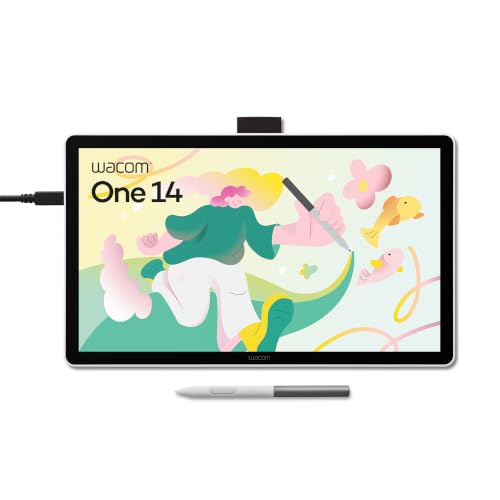
Wacom One 13 (pen display)
Draw directly on the image with Wacom's trademark precision.
- 13.3" Full HD screen
- Paper-like surface
- Pen compatible with other brands
€ 251.49Price as of November 9, 2026 1:21 pm
Learn more for Wacom One 13 (pen display)16 inch displays: the balanced size
16 inches is the sweet spot for most illustrators. There is room to draw from the arm rather than just the wrist, the software panels fit comfortably, and it still sits on a normal desk. This is where the most interesting decision in the comparison lies.
HUION Kamvas 16 Gen3: the best balance of detail and price
Its big advantage is 2.5K QHD resolution. At 16 inches, that pixel density shows in sharper lines, crisper text and less grainy-looking images when you work up close. It is our pick for illustration and comics because it combines size, resolution and a price that remains reasonable.

HUION Kamvas 16 Gen3
16" pen display with 2.5K QHD resolution for illustrating with more detail and room.
- 2.5K QHD resolution
- Well-balanced 16" size
- Ideal for illustration and comics
€ 499.99Price as of November 9, 2026 1:10 pm
Learn more for HUION Kamvas 16 Gen3Wacom Cintiq 16: the studio standard
The Cintiq 16 is Wacom’s classic pen display. Its strength is not the spec sheet but the very accurate Pro Pen 2, the paper-like surface and very mature drivers. Its resolution is Full HD, below the Kamvas 16 Gen3, and its screen is not fully laminated, so you will notice a little more distance between tip and cursor. Even so, it remains the choice of many studios for its reliability and compatibility with all creative software.

Wacom Cintiq 16
Wacom's classic pen display for anyone who wants to draw directly on the image with that familiar feel.
- Very precise Pro Pen 2
- Paper-like surface
- A studio standard
€ 566.80Price as of November 9, 2026 1:21 pm
Learn more for Wacom Cintiq 16XP-Pen Artist 16 (2nd gen): 16 inches on a tight budget
If you want a 16 inch size but your budget is closer to a 13 inch model, the Artist 16 (2nd gen) is the logical choice. It offers a wide surface at a modest price and works very well for illustration and comics. It is a great way to move from a screenless tablet to drawing on the image with plenty of room.

XP-Pen Artist 16 (2nd gen)
16" pen display with good value for money, for moving from a screenless tablet to drawing on the image.
- 16" screen
- Reasonable price
- Great for illustration and comics
€ 299,99Price as of noviembre 9, 2026 1:21 pm
Learn more for XP-Pen Artist 16 (2nd gen)24 inch display for professional work
A 24 inch display changes how you work: you can see the whole illustration at a good size while you draw and keep every panel open. It makes sense if you draw many hours a day, if illustration is your living or if you create large, highly detailed pieces.
The HUION Kamvas 24 Plus offers QHD resolution on a large working surface, designed for daily professional use. Before buying it, measure your desk: a display this size needs depth and a stable stand, and it is worth checking whether the model includes a stand or whether you will need to buy one separately.

HUION Kamvas 24 Plus
Large pen display with QHD resolution designed for professional work.
- QHD resolution
- Large working area
- For everyday professional use
€ 631,57Price as of noviembre 9, 2026 1:10 pm
Learn more for HUION Kamvas 24 PlusHow to choose a pen display for drawing
These are the factors that matter most in your day-to-day use of a pen display:
- Size: 12 to 13″ for small spaces and tight budgets; 16″ for most illustrators; 24″ for intensive professional work.
- Resolution: Full HD is enough at 12 and 13″. At 16″, 2.5K QHD resolution makes a visible difference in sharpness. At 24″, QHD is the recommended minimum.
- Laminated screen: lamination removes the air gap between the glass and the panel. The result: less parallax and the feeling of drawing on the image rather than on a sheet of glass.
- Colour: if you paint in colour or take on commissions, look for good sRGB coverage. For inking and black and white sketching it matters less.
- Surface: a paper-like texture or etched glass slows the pen and gives more control. Smooth glass is more slippery.
- Ergonomics and stand: drawing flat for hours strains your neck. A stand with adjustable tilt is almost essential at 16″ and 24″.
- Drivers and system: Wacom stands out for stability; HUION and XP-Pen have improved a lot. You can go deeper in our HUION vs Wacom vs XP-Pen comparison.
A cheap accessory that greatly improves the experience on any display is a two-finger glove: it stops your hand rubbing the glass, leaving marks or triggering touch by accident.

Tablet drawing glove
Two-finger glove that stops your hand from rubbing the screen, leaving marks or triggering touch by mistake.
- Prevents accidental touches
- Your hand glides more smoothly
- Very cheap
€ 7,99Price as of noviembre 9, 2026 1:12 pm
Learn more for Tablet drawing gloveOnce you have it, follow our guide on how to set up a drawing tablet to calibrate the pen, adjust pressure and assign shortcuts.
Conclusion: which pen display to choose for your profile
If you are starting out or short on space, the XP-Pen Artist 12 (2nd gen) and the HUION Kamvas 13 are the most sensible options; choose the Kamvas 13 if colour is a priority. If you want Wacom in a compact format, the Wacom One 13 does the job. For most illustrators the ideal size is 16″: the HUION Kamvas 16 Gen3 wins on resolution, the Wacom Cintiq 16 on feel and reliability, and the XP-Pen Artist 16 (2nd gen) on price. If you work at it full time and have the room, the HUION Kamvas 24 Plus makes the working day the most comfortable. If you would rather draw away from the computer, also consider our guide on iPad or drawing tablet, and you will find every model in the drawing tablets category.
Compare these 3 products side by side
Frequently asked questions
What is the best value pen display?
At 16 inches, the HUION Kamvas 16 Gen3 offers 2.5K QHD resolution at a mid-range price. If you want to spend less, the XP-Pen Artist 16 (2nd gen) gives you the same size for less money, and in a small format the HUION Kamvas 13 and the XP-Pen Artist 12 (2nd gen) are the most affordable.
What size pen display do I need for drawing?
For most illustrators, 16 inches is the most balanced size. A 12 or 13 inch display is fine for starting out and for small desks. 24 inch models make sense for daily professional use and need a large desk.
Does it matter whether the screen is laminated?
Yes, quite a lot. A laminated screen reduces parallax, the visual gap between the pen tip and the line that appears. That means more accurate strokes and a more natural feel, especially for inking and fine detail.
Is the Wacom Cintiq 16 worth paying more for?
It depends on what you value. The Cintiq 16 stands out for its Pro Pen 2, its paper-like feel and very stable drivers. If you prioritise resolution and price, the HUION Kamvas 16 Gen3 gives you more sharpness for less money.
Does a pen display work without a computer?
No. The models in this comparison are displays that connect to a computer and use its drawing software. If you want to draw without a computer, you need a standalone device such as the iPad Air with Apple Pencil Pro.
Some links on this page are affiliate links: if you buy through them, Ilustreando earns a small commission at no extra cost to you.
Leave a Reply